 Solocord
Plenty of people use a private Discord server or DM as a substitute for a notes app. You can simply send whatever comes to mind into a chat box, which can feel much lighter than opening a traditional notebook app.
Solocord brings that same “send it like a chat message” feeling into a personal notes app. It is not, however, an app intended to replace Discord itself.
This article compares the two for note-taking based on Discord as of September 23, 2026.
They are built for different purposes
Discord’s official homepage describes Discord as group chat for playing games, relaxing with friends, and building communities around the world.
Its core features go far beyond text chat: voice and video, streaming, custom emoji, stickers, soundboards, games, and other activities are all designed around spending time with other people. Being available across PCs, phones, and consoles is another major part of the product.
Solocord, by contrast, is built for leaving notes for yourself. Its interface resembles Discord, but the product is centered on writing, organizing, finding, and backing up notes rather than calls or community management.
| Category | Discord | Solocord |
|---|---|---|
| Main purpose | Group chat with friends and communities | Personal notes |
| Beyond text | Voice, video, streaming, games, activities | Focused on note-taking features |
| Organization | Servers, channels, and other conversation-oriented tools | Servers and channels plus users, tags, search, pins, and more |
| Data model | Used as messages on Discord | Stored locally on the device |
| Offline use | Official site focuses on online communication | App can read and write notes offline |
| Multi-device use | Synced through Discord’s service | Synced with Solosync |
| Account | Sign in to Discord’s service | No account concept for note-taking |
What is good about using Discord as a notebook?
If Discord is already open all day, you can write to your private space without launching another notes app. Many people are already comfortable with servers and channels, and features such as Markdown-like formatting and search can be repurposed for note-taking. Cross-device sync is also genuinely convenient. I sometimes use Discord myself to send temporary images from my phone to my PC because it saves me from managing them as local files.
Discord is also a communication app first, so it is natural to turn a note into a conversation or share it with someone later. Voice, video, screen sharing, and activities all living in one service are strengths a dedicated notes app usually does not have.
But Discord is not a dedicated notes app
Discord is a chat app. It is developed to maximize experiences such as talking with friends, playing, watching streams, and spending time in communities. It has many features for those goals, but long-term management of personal notes is not its primary purpose.
Using Discord as a notebook therefore means repurposing features that were designed for conversation.
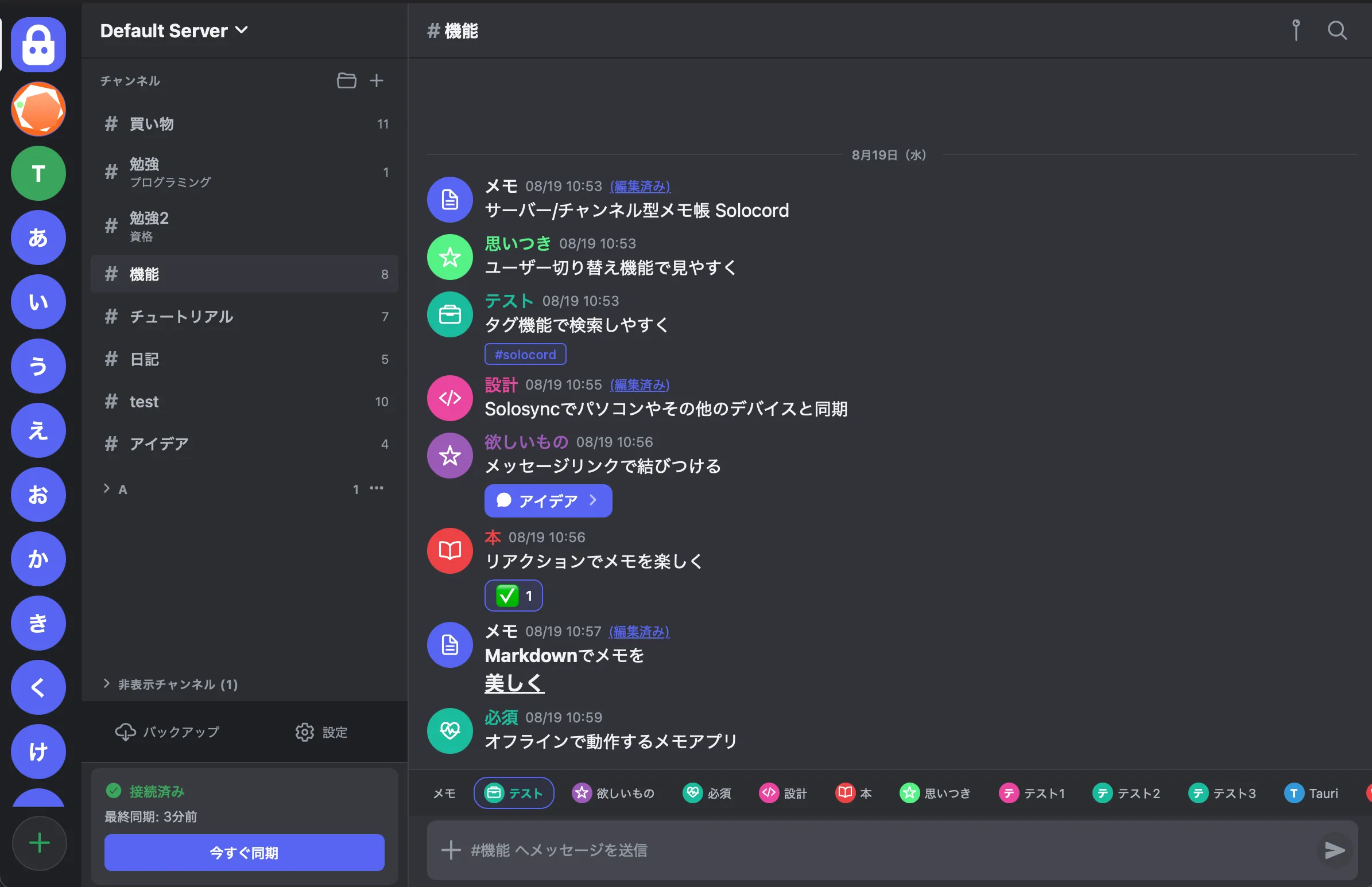
Solocord keeps the Discord-like appearance while adding functions intended specifically for notes. You can group notes across channels with tags, run full-text searches, pin important notes, use reactions as markers, and connect related notes with message links.
“Users” are note types, not people
In Discord, a message’s icon and name identify the account that sent it. That makes perfect sense for a chat app.
Solocord also has a feature called “users,” but it is not for identifying people. It is a quick visual way to classify notes. You might create separate icons and colors for “Shopping,” “Books,” “Ideas,” or “Work,” then switch between them before sending a note.
Even when several kinds of notes share the same channel, users make them easier to distinguish at a glance in the timeline.
Solocord stores notes locally by default
Solocord stores notes on your device, and the app can read and write them offline. If you do not use synchronization, you can keep everything on a single device.
If you want to use several devices, you can enable Solosync. It currently offers these methods:
- P2P: Pair devices with a QR code and transfer notes directly while the devices are online.
- Google Drive: Store sync data in your own Drive.
- Self-hosted: Sync through your own server with PHP and MariaDB.
Instead of forcing all users through one service-side sync system, Solocord lets you choose whether to sync and which method to use.
You can also move notes from Discord to Solocord
If you already use Discord as a notebook, Solocord includes an import feature for bringing those notes over. You invite a bot from inside the app, export the content in Solocord’s format, and import it.
This is not an official Discord migration feature. It is provided by Solocord using Discord’s bot functionality.
Which one should you use?
Staying with Discord makes sense for people who want notes and conversations with friends in the same place, people who already keep Discord open constantly and do not want another app, and people who want to turn notes directly into sharing or conversation.
Solocord makes sense for people who like Discord’s UI but want to separate note-taking from communication, people who want local storage without needing an account, people who want note-specific organization such as tags and users, and people who want to choose their own sync method.
They may look similar, but Discord is “a place to spend time with other people,” while Solocord is “a place to leave things for yourself.”
Solocord is a free, local notes app with a Discord-style interface. →