 Solocord
LazyNote and Solocord both describe themselves as “Discord-style note apps,” but their actual feature sets are quite different.
This article compares them based on LazyNote as of September 23, 2026. I also used LazyNote myself before writing this article, but its pricing and features may change. I plan to keep this article updated when possible.
TL;DR: Solocord leans into Discord; LazyNote stays closer to a notebook
LazyNote is a timeline-first notes app. You create channels for topics and drop notes into them chronologically. Its comment feature also lets you add replies to each note — somewhat like Discord threads. There are no user icons and the UI, while Discord-inspired, feels more like a timeline-style notebook. To me, it feels a little like turning an Obsidian plugin into a standalone app.
Solocord also uses a chat UI, but combines a server/channel structure with users, tags, and other tools so notes can be sorted more visually and in greater detail with very little effort. It also includes Discord-like reactions and message links.
| Category | LazyNote | Solocord |
|---|---|---|
| Basic writing style | Add notes to a chronological timeline | Add notes to channels like chat messages |
| Main organization tools | Topics, comments, search, bookmarks, jump to date | Servers, channels, users, tags, full-text search, pins, reactions, message links |
| Sync | Real-time sync (paid) | P2P, Google Drive, or self-hosted sync (free) |
| Encryption | Explicitly offers password-based E2E encryption | Local storage by default; encryption is currently provided for relay sync |
| Export | JSON export/import | JSON export/import and scheduled backups |
| Pricing | Free offline use plus a Premium plan | All features are free |
| Platforms | iOS / Web | iOS / Android / Windows / macOS / Web |
LazyNote is designed around a timeline
LazyNote’s core idea is the chronological timeline. Its main appeal seems to be letting the timeline itself organize notes naturally.
Features include topic-based notes, comments on individual notes, Markdown, image attachments, URL previews, search, bookmarks, and jumping to a specific date.
Another feature LazyNote emphasizes strongly is E2E encryption. Its official site explains that notes can be end-to-end encrypted with a password.
Solocord adds several organization axes to a chat UI
Solocord first lets you split notes into “servers” and “channels.” On top of that, you can combine “users” with different colors and icons, tags that work across channels, full-text search, pins, reactions, and message links.
A “user” here is not an account for talking to another person. It is a way to visually categorize notes in the same channel — for example, “Shopping,” “Books,” or “Ideas.” You can switch users with one tap from above the text input.
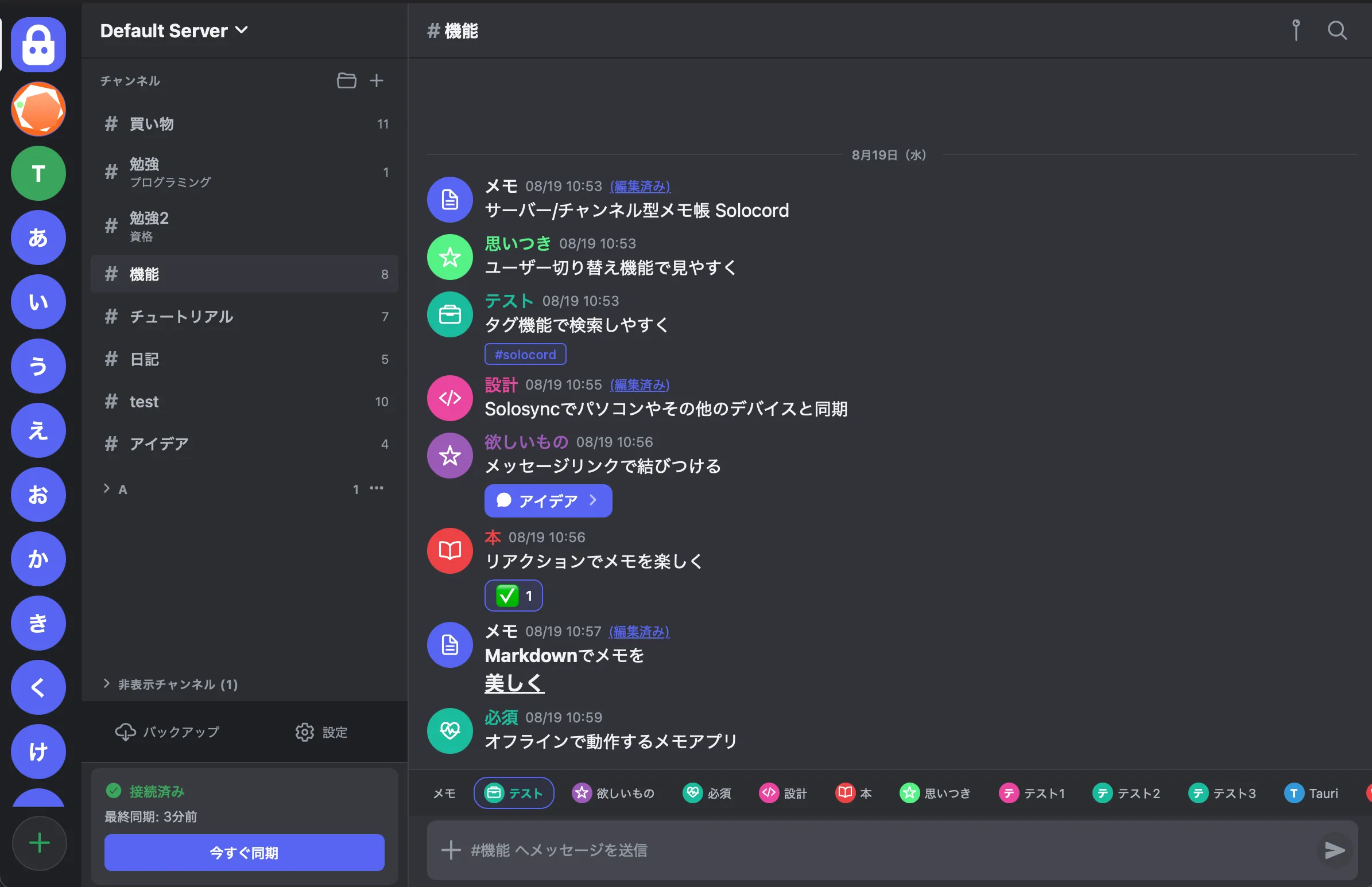
So while LazyNote’s concept is to casually let notes flow into a timeline, Solocord takes the Discord UI more literally and repurposes chat-oriented ideas for note-taking, aiming to cover everything from quick capture to very detailed organization.
Differences in sync
LazyNote presents real-time synchronization across devices as one of its main features. It is close to a conventional cloud-sync experience: write something on your phone, then see it quickly on the web or another device.
Solocord’s Solosync lets you choose the synchronization method itself.
- P2P: Pair devices with a QR code and transfer notes directly between them.
- Google Drive: Store sync data in your own Google Drive, so both devices do not have to be online at the same time.
- Self-hosted: Run a sync server on a server that supports PHP and MariaDB.
You can also skip sync entirely and use Solocord as a local-only notes app on one device. Even when you choose cloud sync such as Drive or self-hosting, online devices can automatically connect over P2P for faster live synchronization.
Pricing
LazyNote’s official site describes the offline version as “free forever” and requiring no account, while also listing a Premium plan. As of September 23, 2026, the site advertises a limited-time three-month free period followed by US$5 per month or US$50 per year.
Solocord has no premium feature tier; all currently released features are free. Development is supported through optional donations. As a side note, features that cost money to operate — such as the P2P relay server or Discord migration — are still free because I have spent a lot of effort tuning them to run on inexpensive shared hosting. They still cost money to operate, of course…
Pricing changes easily, so check the latest information on the LazyNote official site. Solocord currently has no plans to introduce a paid tier, and existing features will not be moved behind one.
Supported platforms
At the moment, LazyNote is available for iOS and the web. A browser version means it can technically be used on many platforms, but native apps and browser apps can still differ significantly in performance and integration.
Solocord supports iOS / Android / Windows / macOS / Web.
How “Discord-like” are they?
Comparing the screenshots at the top of each official site makes the difference fairly obvious. LazyNote is still fundamentally a notes app and its UI is quite removed from Discord, while Solocord deliberately keeps a much more Discord-like interface.
Solocord also provides a migration feature for bringing notes over from Discord.
If your number-one goal is simply “I want a Discord-like notes app,” I think Solocord is much more directly aimed at that use case.
Which one should you choose?
LazyNote’s strengths: people who want maximum simplicity, and people who want E2E encryption.
Solocord’s strengths: a much closer recreation of the Discord experience, lightweight but flexible organization through tags and users, and free synchronization features.
Both apps share the same broad idea: “you should not have to structure a document before writing a note” and “a Discord-like notebook.” From there, the best way to decide is simply to look at the feature sets and interfaces.
Addendum
To TP, the developer of LazyNote: I realize it is a little awkward to say this after writing a comparison article like this, but if anything here is incorrect, or if a feature described as missing is already planned, please contact me and I will update the article.
Solocord is a free, local notes app with a Discord-style interface. →